Tekmetric Payments offers buy now, pay later (BNPL) giving your customers convenient and flexible payment options at checkout using Affirm, Klarna, or Sunbit. Accessible from within the RO Invoice, customers can easily select from our BNPL providers, quickly log in to their account (or create a new one), and choose the payment option of their choice.
How to Enable Buy Now, Pay Later
In order to enable this feature, please contact Tekmetric Payments at 832-930-9400 option 2 for Tekmetric Payments then option 2 for Tekmetric Payments Support, or email at tps@tekmetric.com to get started.
How Does It Work?
Affirm, Klarna, and Sunbit offer payment options (learn more) based on factors such as customer credit, prior account history, and RO amount. When paying with BNPL, customers are redirected to Affirm, Klarna, or Sunbit's website from the RO Invoice, where they authorize the payment by agreeing to the terms of a payment plan, then return to Tekmetric to complete their purchase. After payment acceptance, the full amount paid (minus processing fees similar to that of a credit card) is made available to your Tekmetric Payments account upfront, and Affirm, Klarna, or Sunbit collects the amount from your customer directly (including any interest, if applicable).
The fund settlement time for BNPL operates similarly to that of a credit card meaning deposits will be cleared and settled in 1-2 business days into your Tekmetric Payments account.
⚠️ IMPORTANT: There is no risk to you if your customer misses a payment or defaults on their financing options.
BNPL Pre-Qualify Flow in the Estimate
When Affirm and Sunbit are enabled, your customers can go through the pre-qualify flow within the Estimate link. If your customer's estimate is greater than $250, Affirm and Sunbit messaging will be displayed in the Estimate, where the customer can go through the pre-qualify flow prior to approving services on their vehicle. This can be valuable for customers who are unable to pay up front for all work recommended. With an Affirm or Sunbit pre-qualification at time of estimate, customers may choose to approve more services you're recommending, potentially increasing your ARO and close ratio long term!
Viewing Customer Pre-Qualification Status (Sunbit)
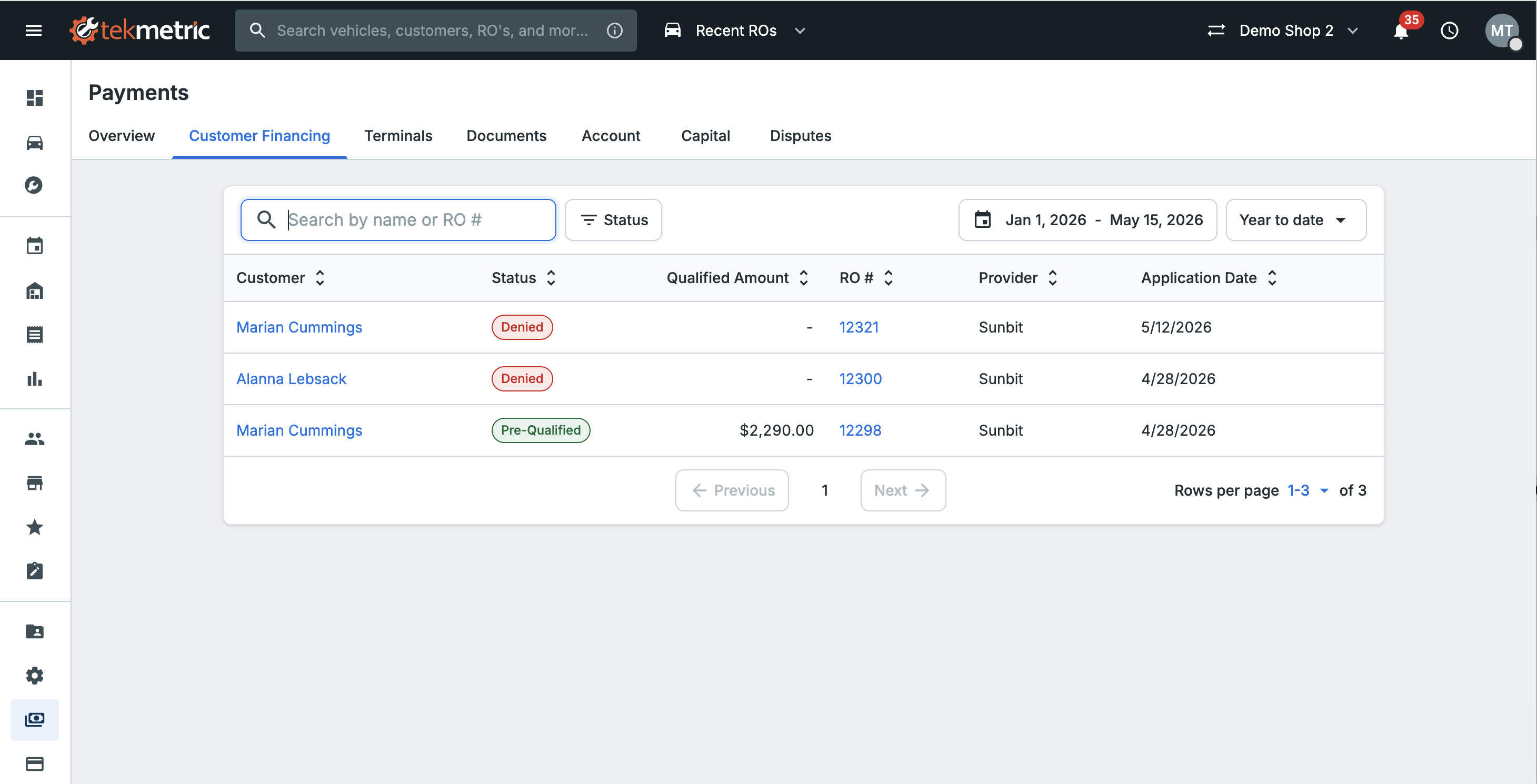
When Sunbit is enabled at your shop, you can now see which of your customers have applied for pre-qualification, their status, and pre-qualified amount — giving you visibility into potential financing availability before you begin work on the vehicle. Final approval is determined when the customer completes a full application at the time of payment.
This information is available in two places.
All Customers (Payments Hub)
To see every customer who has gone through Sunbit pre-qualification at your shop:
- Open the Payments Hub.
- Select the Customer Financing tab.
- Review the list of customers, including pre-qualification status (Pre-Qualified or Denied), pre-qualified amount, and a link to the associated Repair Order.
- Click the linked RO number to jump to the related repair order, or click the customer's name to open their full record.
Individual Customer
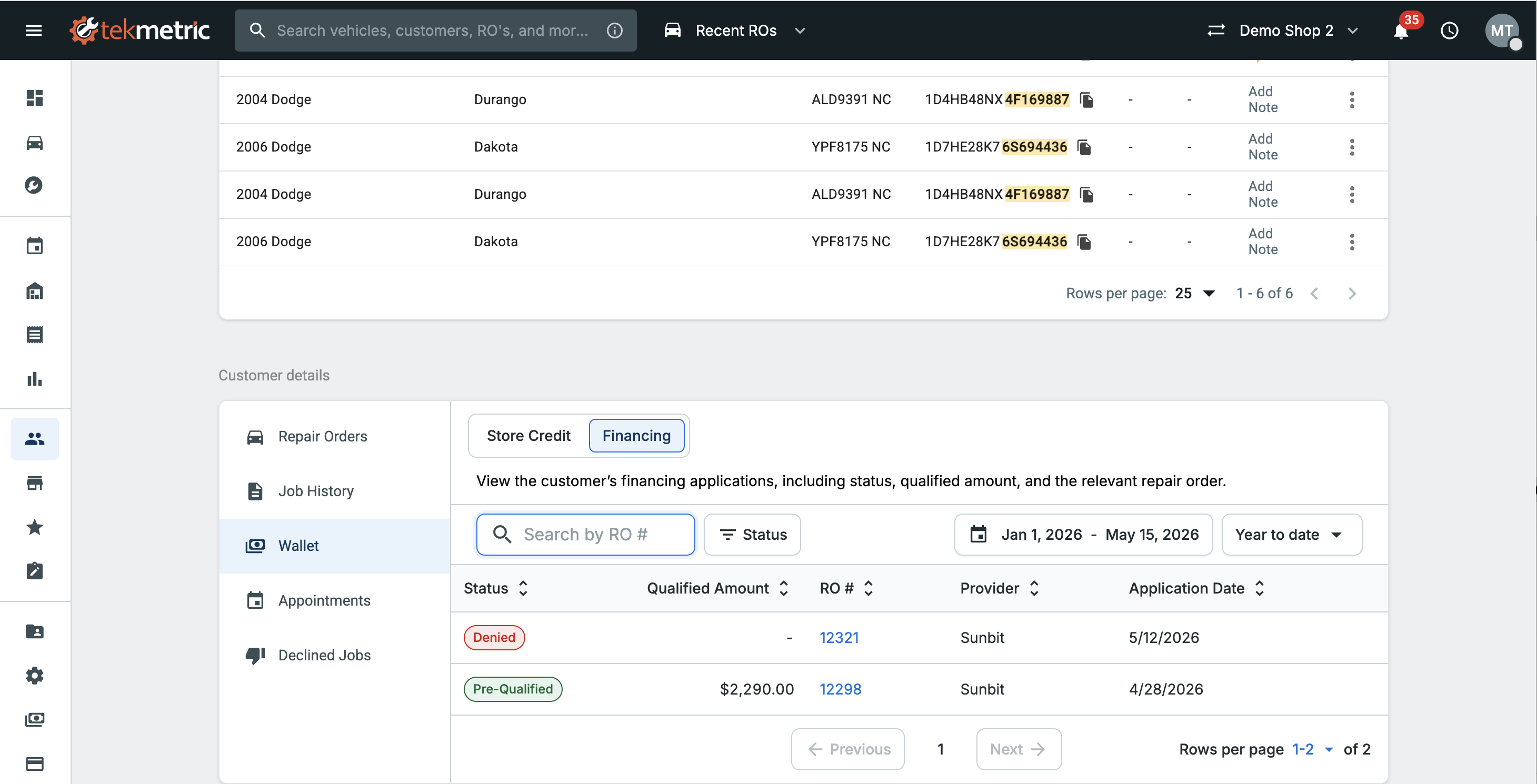
To see a specific customer's pre-qualification history:
- Open the customer's record from the Customers tab, or by clicking their name in the Customer Financing tab.
- Open the Financing tab in their wallet.
- Review the customer's full Sunbit history, including past and current pre-qualification attempts, statuses, and amounts.
⚠️ IMPORTANT: Pre-qualification visibility is currently available for Sunbit only. Support for additional BNPL providers is on our roadmap.
Taking Payment With Affirm, Klarna, or Sunbit
Affirm, Klarna, and Sunbit are accessible to customers via the Make Payment button on the RO Invoice. Affirm is also accessible as a QR code on your Stripe terminal (click here to learn more). For existing Affirm, Klarna, or Sunbit users, they can easily login to their account and choose the payment option of their choice making for a nearly one-click checkout experience. For new users, they will need create an Affirm, Klarna, or Sunbit account during checkout prior to completing their purchase.
⚠️ IMPORTANT: BNPL is only available for ROs of $250 or more. For Sunbit, there is a maximum limit of $20,000. For Affirm, the maximum limit is $30,000; while Klarna will be dependent upon the customer's personal financial information (learn more).
Payment Options
Affirm, Klarna, and Sunbit offer slightly different payment options depending on the RO amount as well as the customer's financial profile via Affirm, Klarna, or Sunbit (payment option availability and eligibility may vary).
Affirm
Pay in 4 - Customers pay for purchases in four or fewer interest-free, bi-weekly payments over an 8 week term.
Monthly Installments - Customers pay for purchases over a longer term of up to 36 months, which might include interest.
Klarna
Pay in 3 or 4 - also known as Installments, customers pay for the purchase in three or four interest-free payments.
Monthly installments - Also known as Financing, customers pay for the purchase over a longer term of up to 36 months, which might include interest.
Pay later - Customers pay for the purchase in a single payment in 30 days.
Pay now - Customers pay for the purchase immediately using a linked card, bank debit, or bank transfer.
Sunbit
Down Payment - Customers are required to make a down payment when finalizing their purchase. This down payment goes toward the total purchase amount.
Pay in 4 - Four monthly interest free payments for all approved customers.
Monthly installments - Customers pay for purchases with a 3, 6, or 12-month flexible payment plan, which might include interest.
Soft Credit Check
Affirm (learn more), Klarna (learn more), and Sunbit (learn more) will perform a soft credit check on your customers for financing options. Soft credit checks do not affect your customer's credit score and will not be visible to other lenders.
Marketing Resources
Click the links below if you'd like to order customer facing materials from Affirm, Klarna, or Sunbit for marketing purposes.
Affirm
Affirm Marketing Resources
Klarna
Klarna Global Marketing Assets & Brand Guidelines
Sunbit
Sunbit Digital Marketing Assets and FAQs
FAQs
Q: Can shops see the customer’s approved loan amount in Tekmetric? A: For Sunbit, yes — shops can view pre-qualification status and approved amounts in the Customer Financing tab in Payments Hub, or on the Financing tab within an individual customer's wallet. This is not currently available for Affirm or Klarna; customers must share that information directly if needed.
Q: My customer was pre-qualified for $5,000 — can I bill them for that amount? A: Pre-qualification is not a guaranteed credit line. The customer must complete a full application at checkout, where they may be approved for less or denied entirely. Use pre-qualification as a planning signal, not a billing authorization.
Q: What happens if the customer’s loan does not cover the full invoice amount? A: Any unfunded remainder remains due and must be paid by the customer through other means.