Nexpart Multi-Seller is an eCommerce platform that allows you to find the right part and order directly from multiple suppliers at the same time. This article reviews how to connect your Nexpart Multi-Seller account to Tekmetric for seamless part quoting and ordering on your estimates.
Nexpart Multi-Seller Account
If you don't have a Nexpart Multi-Seller account and are interested in the integration, you can sign up on the Nexpart website - click here.
Once you create an account, you will then navigate to your Tekmetric shop to connect the integration.
Connect Nexpart Multi-Seller To Tekmetric
-
Click into Shop Settings on the left navigation menu, then select the Integrations tab
-
Find the Nexpart integration card
-
Click Manage, then add your Nexpart Multi-Seller Username & Password.
Note: Review / Submit orders from Nexpart Multi-Seller toggle -- if you need to review certain items such as shipment location, or any other details prior to submitting a purchase order with your supplier, then you can toggle this on. This will punch you out to Nexpart to finish a purchase order, rather than ordering from within Tekmetric. Watch the video at the end of the article to see both flows.
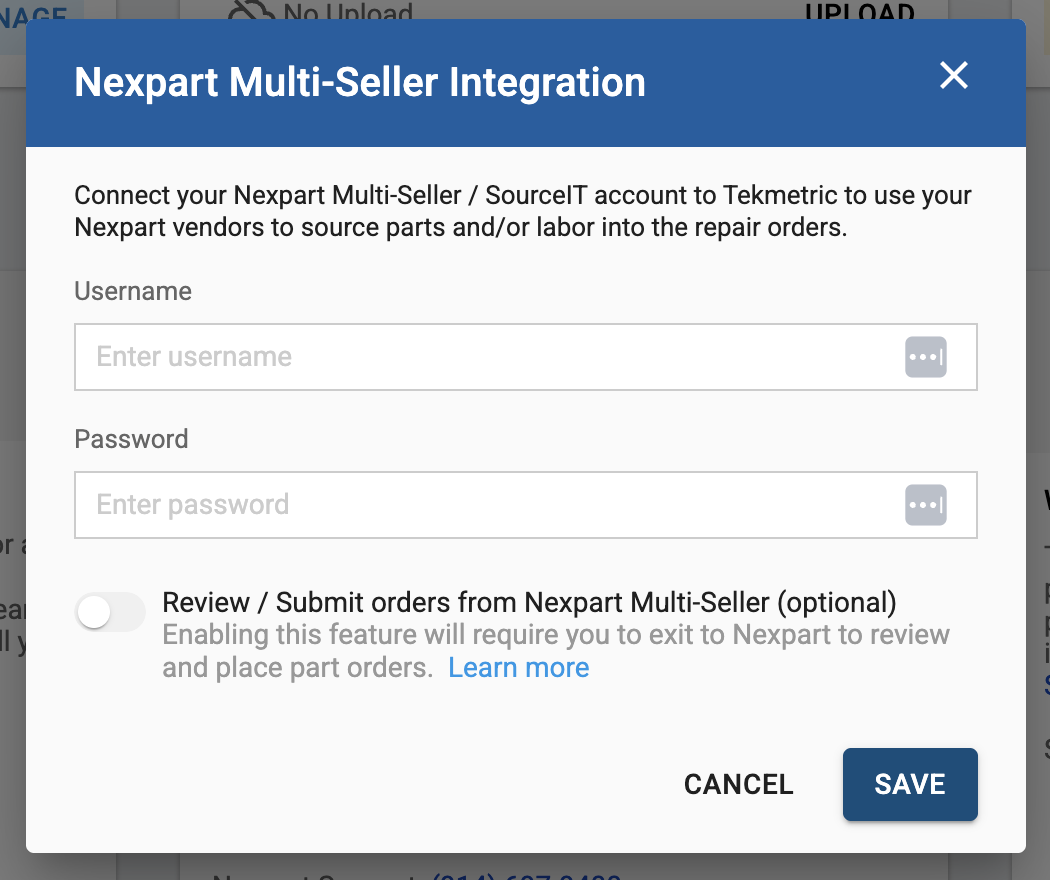
Once you add your information, click SAVE to finalize and connect Nexpart to Tekmetric.
Quoting & Ordering from Nexpart Multi-Seller
Once connected, you'll be able to order and quote parts seamlessly on the estimate. For more information, watch the video below, or visit our Quoting & Ordering Parts article.