Notes: Appointment confirmations and reminders are not marketing messages—those are transactional and don't require opt-in. Marketing opt-in is only required for promotional/marketing text messages. Customers do not opt-in to email, but they can unsubscribe by using the unsubscribe link on any email.
Why Your Subscribed Customer Base Matters
Growing and managing your subscribed customer base helps you:
-
Reach more customers with campaigns and offers that drive repeat business
-
Fill your schedule by staying top-of-mind when customers need service
-
Build loyalty by keeping customers engaged between visits
-
Increase revenue by converting declined services and bringing back inactive customers
-
Stay compliant with federal regulations that require customer consent for promotional messaging
The most successful shops actively work to grow their subscribed customer base over time—not just set it and forget it.
How to See Your Subscribed Customer Base
View Total Subscribers
The fastest way to check your total subscribed customer base is by using Tekmetric Marketing's Customer Segments feature. Viewing your All Customer segment will give you a high level view of your total customer count and the number of customers with eligible phone numbers and emails that you can market to.
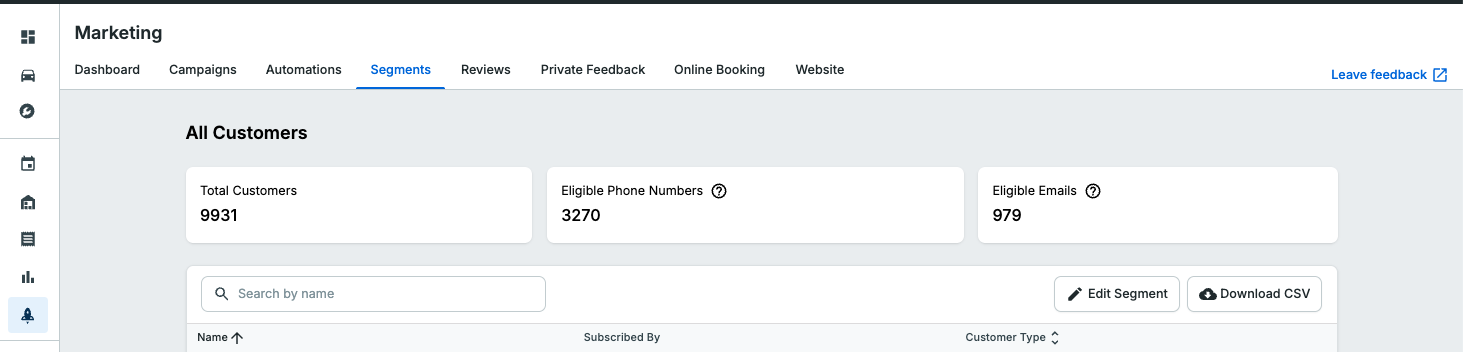
Definitions
Eligible Phone Numbers is the count of customers whose primary phone number is subscribed to receive marketing messages.
Eligible Emails is the count of customers who have a valid email address and have not unsubscribed from marketing emails.
Check Individual Subscription Status
To see whether a specific customer is subscribed, open their customer profile and you'll see a subscription status badge next to each phone number.

Subscription status is tracked separately for each phone number and email address, not per customer. If a customer has multiple phone numbers, one might be subscribed while another is not. Marketing text messages are only sent to the phone number marked as Primary.
What each status means:
-
Subscribed: The customer has opted in and will receive your marketing messages
-
Not Subscribed: The customer has not opted in yet and won't receive marketing messages
-
Unsubscribed: The customer previously opted in but then opted out (usually by replying STOP to a text message)
Understanding "Market to Customer" and How it Works with Subscribed Status
The "Market to Customer" checkbox on the customer profile is your shop's internal preference—it means you want to send marketing to that customer. But the customer also needs to be Subscribed (opted in) to actually receive your messages.
Both need to be true for a customer to receive marketing communications:
- "Market to Customer" is checked (your preference and you control)
- Customer is "Subscribed" (their consent, they control)
How to Grow Your Subscribed Customer Base
Promote Your Online Booking Link
When customers book appointments through your online booking widget, they see a checkbox to opt in to marketing messages. If they check the box and complete their booking, they're automatically added to your subscribed customer base.
This is one of your primary tools for growing your subscribers. The more customers who use online booking, the more opt-in opportunities you create.
Where to promote your booking link:
-
On your website: Add the booking widget to your homepage and service pages. Use clear language for any button or link, ie "Book Now" or "Schedule a Service" or "Book an Appointment"
-
Google Business Profile: Add your booking link so customers can book directly from Google search results. Tekmetric adds your booking link automatically, for you!
-
Social media: Share your booking link in your bio, posts, and stories on Facebook and Instagram
-
Email signatures: Include your booking link in every email your team sends
-
Printed materials: Include your booking link on business cards, invoices, and vehicle inspection reports
-
In-shop signage: Display QR codes or your booking URL at the service counter
Pro tip: Offer an incentive for customers who book online. This encourages more customers to use online booking—which means more opt-in opportunities.
Let Customers Text JOIN to Subscribe
Customers can now opt in to marketing messages by texting JOIN to your shop's Tekmessage number. This gives you a simple way to grow your subscribed customer base without requiring customers to use online booking.
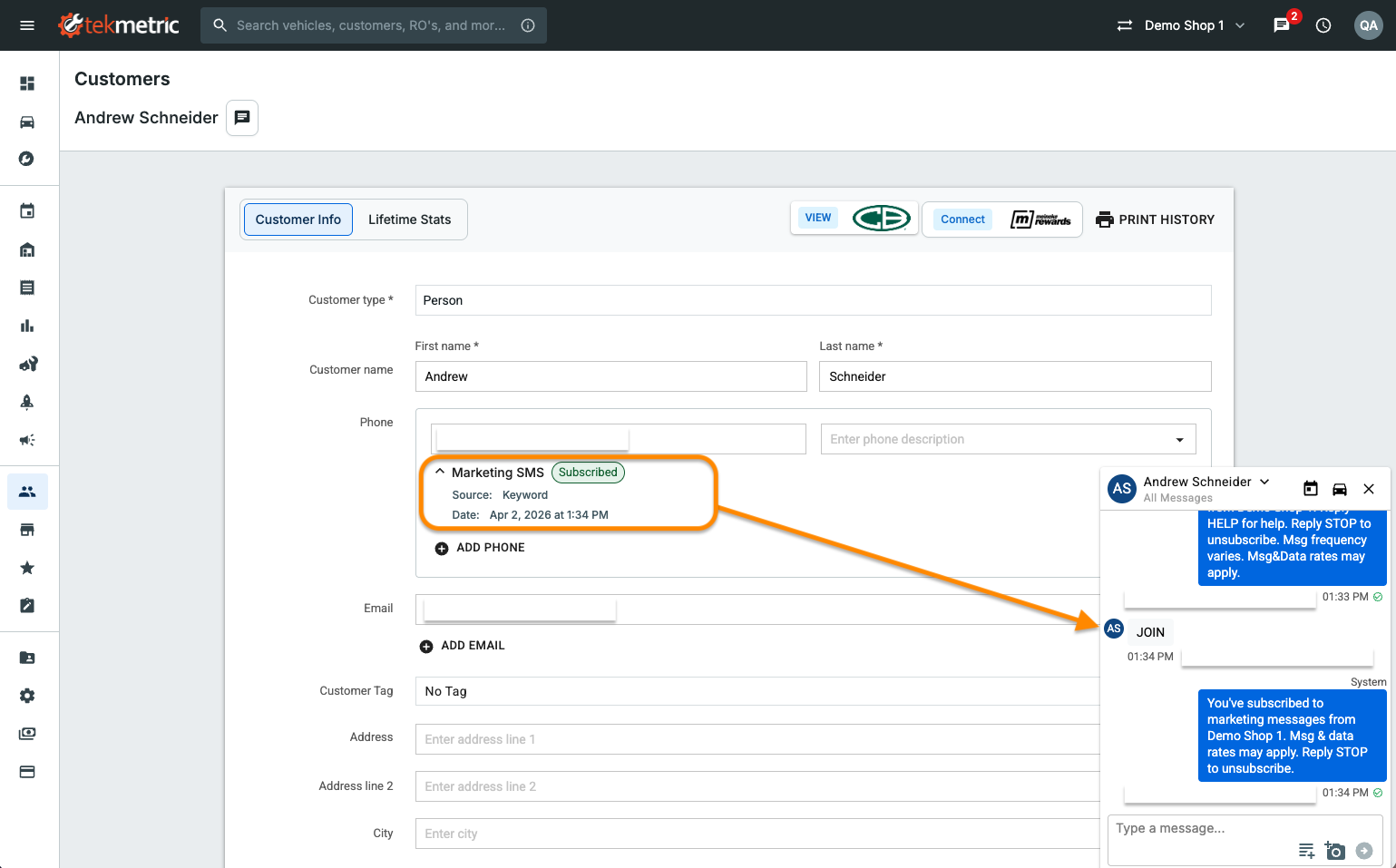
How it works:
- A customer texts JOIN to your shop's phone number
- Tekmetric automatically subscribes them to marketing messages
- The customer receives a confirmation text letting them know they're subscribed
Where to promote JOIN:
-
In-shop signage: Post signs at your service counter with your phone number and "Text JOIN to get service reminders and exclusive offers"
-
Business cards: Add "Text JOIN to [your number] for updates" to your cards
-
Invoices and Estimate TOS: Include a line at the bottom: "Stay connected! Text JOIN to [your number]"
-
Social media posts: Share posts like "Never miss a maintenance reminder! Text JOIN to [your number]"
-
Email signatures: Add a line to staff email signatures promoting the JOIN keyword
Pro tip: Make it easy for customers to see the value. Instead of just "Text JOIN," say something like "Text JOIN to [your number] to get seasonal service reminders and never miss a deal."
Note: Customers can also text START to re-subscribe if they previously unsubscribed.
Encourage Customers to Opt In
When customers use online booking or see your JOIN promotion, make sure they understand the value of opting in to marketing messages.
What to tell customers:
- "Get exclusive service reminders and special offers by text"
- "Stay up to date on seasonal maintenance deals"
- "Be the first to know about our promotions"
- "Get convenient reminders for recommended services"
The more clearly you communicate the benefit, the more likely customers are to opt in.
Managing Unsubscribes
When Customers Unsubscribe
If a customer replies STOP to one of your text messages, Tekmetric automatically unsubscribes them. Their status will change to "Unsubscribed" and they won't receive any more marketing messages from you. Note: If the customer is unsubscribed and Market to Customer is checked, the customer will not receive marketing messages.
Federal regulations require you to honor unsubscribe requests immediately. Tekmetric handles this automatically—you don't need to take any action.
Tracking unsubscribes: When a customer unsubscribes, Tekmetric attributes the unsubscribe to the most recent marketing message they received (either a campaign or automation). You can see unsubscribe metrics in your [Link to: Marketing Dashboard] to understand which messages are causing customers to opt out.
Can You Re-Subscribe Someone?
No. If a customer unsubscribes, they would need to opt back in themselves—either through online booking or by texting JOIN (or START) to your shop's phone number. You cannot manually re-subscribe a customer who has opted out—this is a legal requirement, not a platform limitation.
Reducing Unsubscribes
The best way to keep customers subscribed is to send valuable, relevant messages:
- Don't over-send campaigns—1-2 targeted campaigns per month is a good starting point
- Segment your campaigns so customers only receive relevant offers
- Focus on service reminders and helpful tips, not just sales messages
- Make your messages genuinely useful (e.g., "Time for your seasonal tire rotation" not just "20% off everything")
Customers who find your messages valuable are much less likely to unsubscribe.
Compliance & Best Practices
Federal regulations require customer consent before sending promotional text messages. Tekmetric keeps you compliant automatically, but here's what you should know:
What requires opt-in:
- Marketing campaigns promoting services, offers, or sales
- Any message encouraging a customer to book or buy
What doesn't require opt-in:
- Appointment confirmations
- Appointment reminders
- Responses to customer-initiated texts
Best practices:
- Promote online booking and the JOIN keyword to give customers easy opt-in opportunities
- Never manually add customers to your subscribed customer base without their explicit permission
- Honor unsubscribe requests immediately (Tekmetric does this automatically)
- Focus on sending valuable, relevant messages to reduce unsubscribes
Tekmetric automatically includes opt-out language and handles unsubscribe requests to keep you compliant with 10DLC and TCPA regulations.
FAQ
Q: How do I see my total subscriber count?
A: Check your All Customers segment. This shows how many customers are currently opted in to receive marketing messages and you can see exactly who is and is not subscribed to email and/or text messages.
Q: Why do some customers show "Not Subscribed" even though I've been texting them?
A: Appointment confirmations and reminders and service-related messages don't require opt-in because they're transactional messages. But to send marketing campaigns or declined service reminders, the customer needs to opt in first—either through online booking or by texting JOIN to your shop's number.
Q: Can I manually subscribe a customer if they tell me they want to receive my marketing messages?
A: No. Customers can subscribe themselves by texting JOIN to your shop's phone number. You can let them know about this option, and they can opt in on the spot from their own phone.
Q: What happens if I send a campaign to someone who's "Not Subscribed"?
A: Tekmetric automatically filters out customers who haven't opted in. They won't receive the campaign, even if you include them in your segment.
Q: How can I grow my subscribed customer base faster?
A: Focus on promoting both your online booking link and the JOIN keyword everywhere customers interact with you—your website, Google Business Profile, social media, email signatures, in-shop signage, invoices, and business cards. Consider offering a small incentive (like a discount) for customers who opt in.
Q: If a customer unsubscribes, can I re-subscribe them?
A: No. Federal regulations require that you honor unsubscribe requests. The customer would need to opt back in themselves—either through online booking or by texting JOIN or START to your shop's number.
Q: Is there a "best practice" size for my subscribed customer base?
A: Your goal should be steady growth over time. A healthy subscribed customer base grows as you acquire new customers and encourage existing customers to opt in through online booking or by texting JOIN. Focus on the percentage of your total customer base that's subscribed, not just the absolute number.
Have feedback on Tekmetric Marketing? Submit your suggestions here.