Overview
We've updated the estimate permissions in Tekmetric to give shop owners and admins more precise control over what employees can see and do within the Estimate tab of an RO. Previously, estimate access was fairly all-or-nothing - employees either had broad access or none at all. With this update, you can limit things like discount creation and part pricing adjustments without blocking employees from doing the rest of their job. This article explains what's changed, how the new permissions work, and how to configure them for your employees.
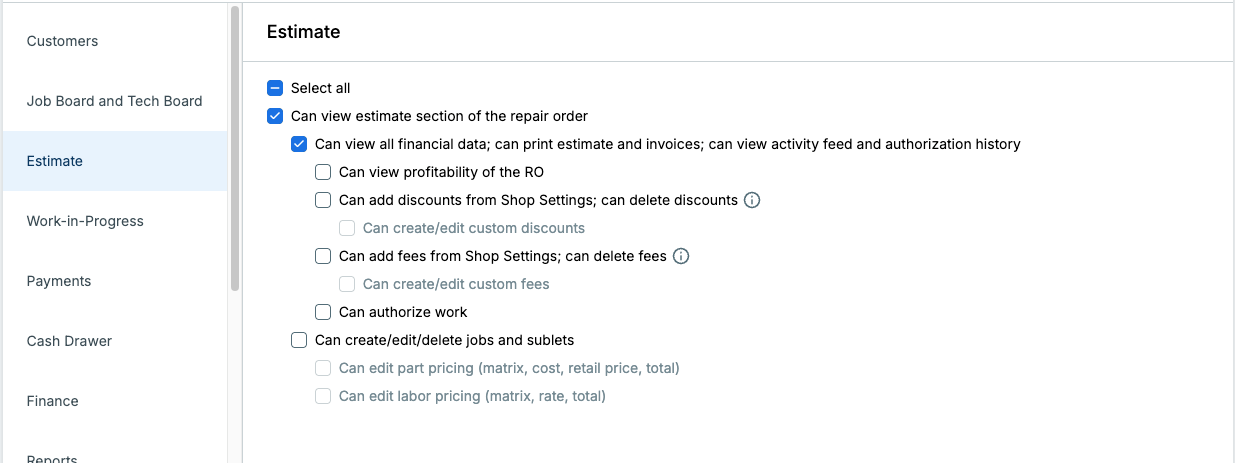
New Version
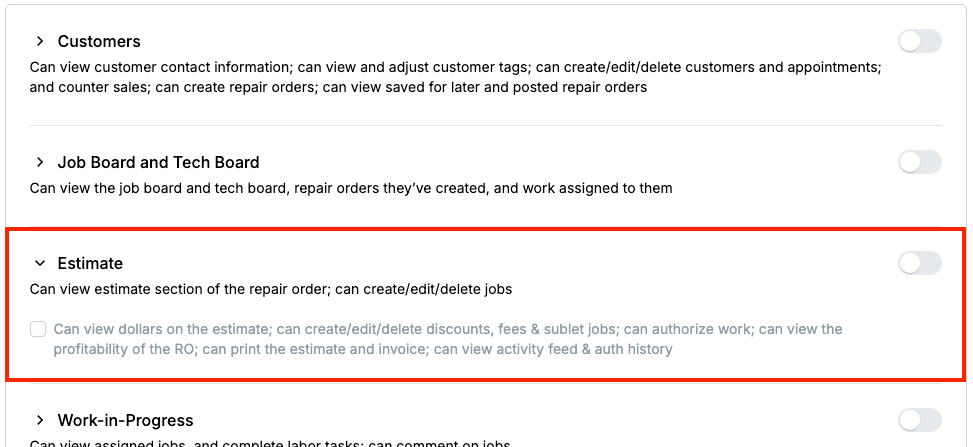
Old Version
What's New
Three things changed with this release:
- A redesigned permissions form with a left-side navigation bar, making it easier to jump to the section you need instead of scrolling through the entire form.
- Existing estimate permissions have been split into granular, action-based controls. What was previously a small set of broad checkboxes is now a more detailed set of individual permissions - giving you precise control over exactly what each employee can see and do within the Estimate tab.
- New permissions for discounts, fees, and part and labor pricing. We've added net-new controls that let you manage whether employees can apply discounts and fees and whether they can create custom discounts and fees on estimates. Additionally, we’ve added new permissions to control which employees can modify part and labor pricing on estimates.
Important: No existing employee permissions have been changed. Employees who had estimate access before this release still have that same access. Employees who did not have estimate access before this release still do not. You're in control of any changes - nothing has been added or removed on your behalf.
Note: This update only changes the Estimate section of the permissions form. All other sections (Customers, Job Board, Payments, etc.) remain the same.
Navigating the Updated Permissions Form
To access employee permissions, go to an individual employee’s or permission group’s profile page.
You'll now see a left-side navigation bar that lets you jump directly to any section of the form - Customers, Estimate, Job Board & Tech Board, Work-in-Progress, Payments, and more. This replaces the previous single-column scroll layout. The section names in the sidebar match the section headers you're already familiar with. You’ll also notice a new “Select all” checkbox at the top of some sections, designed to save you time when making edits.
Tip: Click Estimate in the left sidebar to jump directly to the updated estimate permissions.
Estimate Permissions Explained
The estimate permissions are structured hierarchically. The top-level permission controls whether an employee can access the Estimate tab at all, and additional checkboxes below it unlock specific capabilities within that tab.
1. Can View Estimate Section of the Repair Order (parent permission)
This is the top-level permission for the Estimate tab. Enabling it gives the employee read-only access to the estimate - they can see that the tab exists and view its contents, but they cannot make any changes.
All other estimate permissions below depend on this one being enabled first.
2. Can View All Financial Data; Can Print Estimates and Invoices; Can View Activity Feed and Authorization History
Enabling this unlocks financial visibility, the ability to print estimates and invoices, and the ability to see the Activity Feed and Authorization History located in the Summary tab of the RO.
Note: Profitability data is controlled separately by the permission below - enabling this checkbox does not show profitability figures.
3. Can View Profitability of the RO
This permission controls whether an employee can see profitability data on the estimate.
4. Can Add Discounts from Shop Settings; Can Delete Discounts (net new)
This permission controls whether or not employees can apply discounts to ROs and jobs, but only from the predefined list of discounts set up in Shop Settings. Employees with this permission cannot create custom discounts; they can only select from what's already been configured. This permission also controls whether or not employees can remove discounts from ROs and jobs.
Dependency: For job-level discounts specifically, the employee must also have Can Create/Edit/Delete Jobs and Sublets enabled. Without it, they won't be able to manage discounts at the job level.
Note: This does not control an employee’s ability to set up package pricing on jobs.
5. Can Create/Edit Custom Discounts (net new)
This permission is a step above the predefined-only discount access above. Enabling it allows employees to enter any discount they want - not just ones from the predefined list in Shop Settings.
Dependency: For job-level discounts specifically, the employee must also have Can Create/Edit/Delete Jobs and Sublets enabled. Without it, they won't be able to manage discounts at the job level.
6. Can Add Fees from Shop Settings; Can Delete Fees (net new)
Same logic as discounts above, but for fees. This permission controls whether or not employees can apply fees to ROs and jobs, but only from the predefined list of fees set up in Shop Settings. Employees with this permission cannot create custom fees; they can only select from what's already been configured. This permission also controls whether or not employees can remove fees from ROs and jobs.
Dependency: For job-level fees specifically, the employee must also have Can Create/Edit/Delete Jobs and Sublets enabled. Without it, they won't be able to manage fees at the job level.
7. Can Create/Edit Custom Fees (net new)
This permission is a step above the predefined-only fees access above. Enabling it allows employees to enter any fee they want - not just ones from the predefined list in Shop Settings.
Dependency: For job-level fees specifically, the employee must also have Can Create/Edit/Delete Jobs and Sublets enabled. Without it, they won't be able to manage fees at the job level.
8. Can Authorize Work
This permission controls whether an employee can authorize work on the Estimate.
9. Can Create/Edit/Delete Jobs and Sublets
This controls whether an employee can add, modify, or remove jobs and sublets within the estimate. This is the primary "write" permission for the estimate. However, the permissions listed below control whether an employee can edit part and labor pricing on jobs.
10. Can Edit Part Pricing
This controls whether an employee can modify part cost, retail, total, and part matrices on part lines within jobs.
11. Can Edit Labor Pricing
This controls whether an employee can modify labor rate, total, and labor matrices on labor lines within jobs.
Frequently Asked Questions
Has this release affected employee permissions in any way? No. Employee permissions have not been changed as part of this release. If an employee had estimate access before this update, they still have exactly that same access. If an employee did not have estimate access, they still don't. Nothing has been added or removed on your behalf - any changes to permissions are yours to make.
Does this apply to Permission Groups? Yes. If you manage permissions through Permission Groups, the new estimate checkboxes are available there as well. Updating a group will update all employees assigned to that group.