Overview
Cash rounding is an optional feature that rounds the change due back to the customer to the nearest $0.05 when your shop cannot source pennies. This feature is available in response to the U.S. penny phaseout, which began in November 2025 when the U.S. Mint stopped producing pennies.
Learn more: U.S. Treasury Penny Production Cessation FAQs
If you don't yet see this setting available for your shop, please contact our support team, and they'll be happy to get it enabled for you.
Why Your Shop Might Need This
Pennies are no longer circulating in most areas, and banks can no longer source them. This creates a real problem at the point of sale: when a repair order totals $347.86 and a customer hands over $348.00, the service advisor owes $0.14 in change—but that requires four pennies, which aren't available.
Without cash rounding, advisors face two difficult options:
- Convert the small overpayment to a store credit account entry (creating account clutter)
- Manually work around the problem outside your system
Cash rounding eliminates this friction automatically. When enabled, the system rounds the change due to the nearest nickel. In this case, the $0.14 rounds to $0.15—the customer actually gets an extra penny. The invoice total stays the same. Only the change calculation changes, and the rounding adjustment is captured for your recordkeeping.
Rounding Rules
Per U.S. Treasury guidelines (in alignment with recommendations from the National Conference of State Legislatures), Tekmetric applies symmetrical rounding to cash change due. This method rounds to the mathematically nearest nickel.
| Change due ends in |
Rounds to |
| $0.01–$0.02 |
$0.00 |
| $0.03–$0.07 |
$0.05 |
| $0.08–$0.09 |
$0.10 |
Treasury Requirements
Per U.S. Treasury guidance, rounding applies only to change due, not to invoice components. Rounding never affects taxes, fees, labor, parts, or any other line item on the repair order. The invoice total and all its components are calculated and recorded at full precision. Rounding happens in the final step—when calculating the physical cash change the customer receives.
Per U.S. Treasury guidance, sales tax is always calculated on the original invoice amount and is never affected by change rounding. The amount you remit to your state tax authority is based on the unrounded total.
How It Works
For Shop Owners
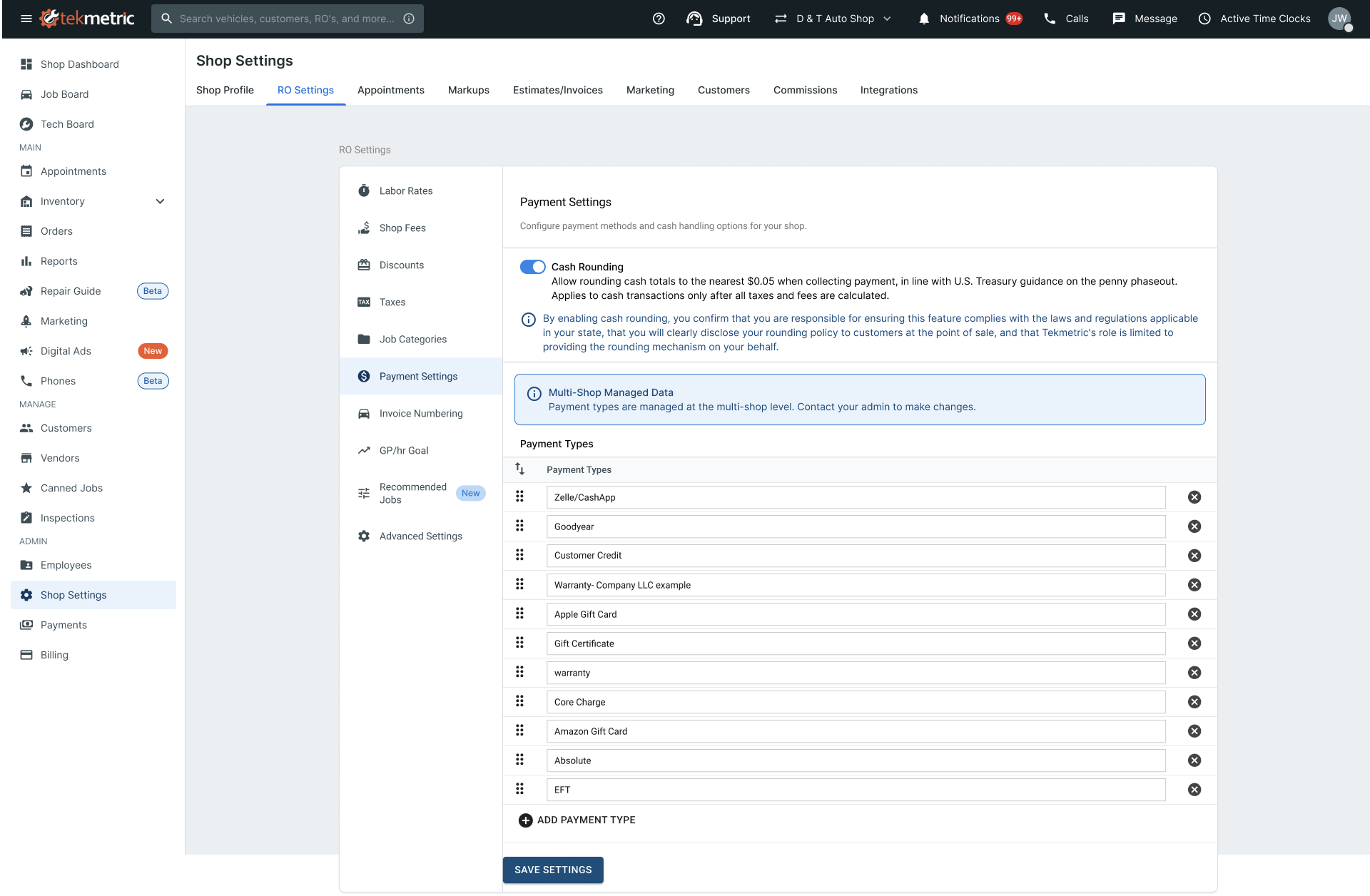
To Enable Cash Rounding
- Go to Shop Settings → Payment Settings
- Locate the Cash Rounding section
- Toggle Enable Cash Rounding to On
- Review and acknowledge the disclosure statement confirming that:
- You are responsible for ensuring this feature complies with applicable state and local laws
- You will clearly disclose your rounding policy to customers at the point of sale
- Click Save
Rounding is live and available immediately for all subsequent cash transactions. You can disable it at any time.
Viewing Cash Rounding Adjustments in Your Reports
Tekmetric tracks all cash rounding adjustments so you can audit rounding activity and maintain accurate financial records without negatively impacting your GP or margins. Cash rounding adjustments appear in two places:
End-of-Day (EOD) Report
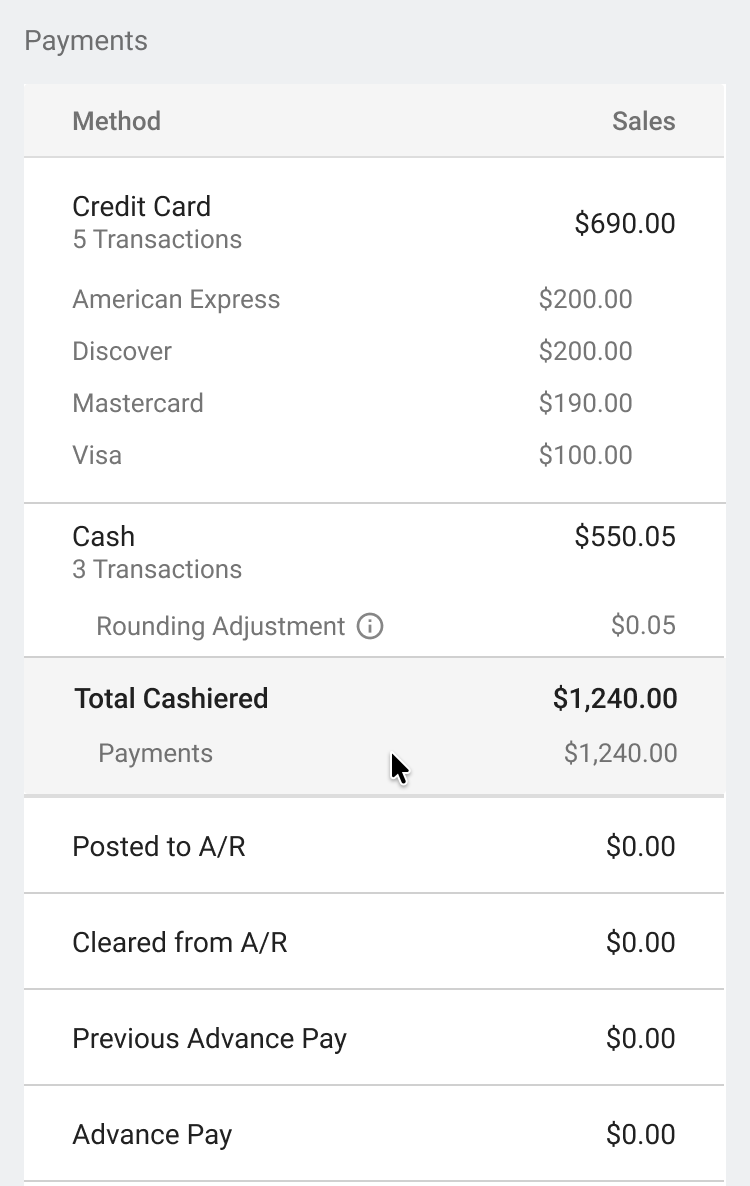
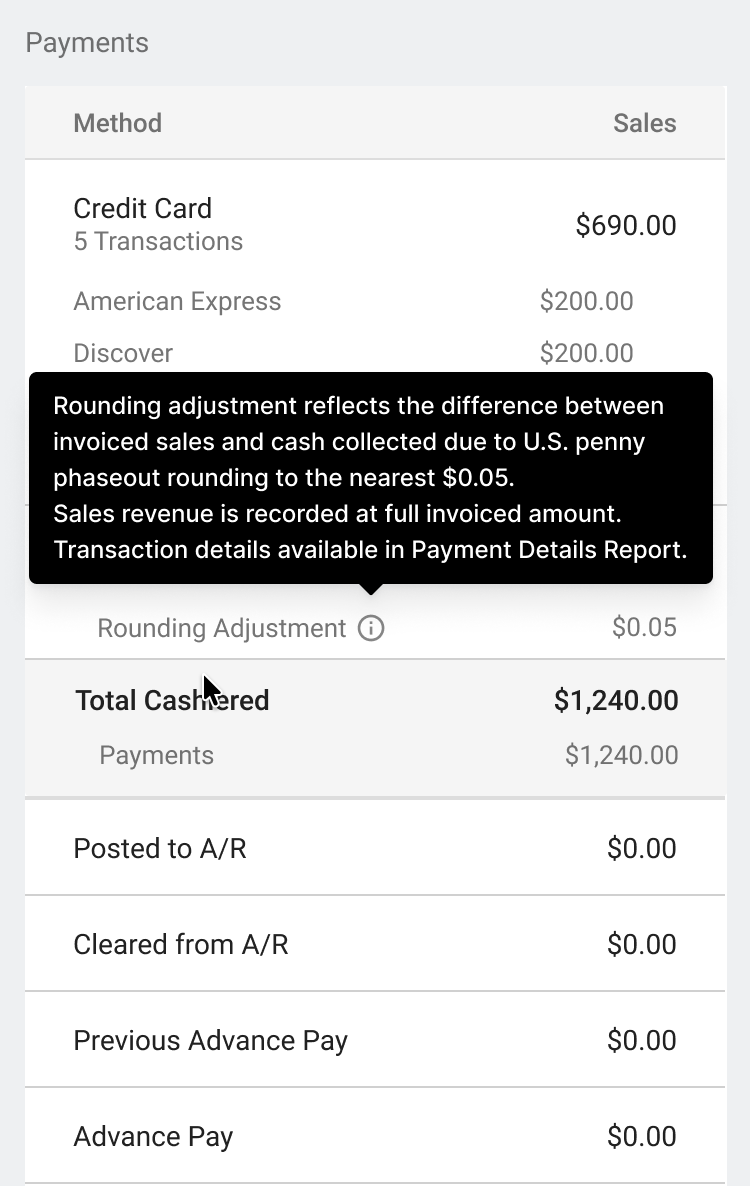
In your EOD Report, your Cash subtotal reflects the RO invoice totals paid via cash (pre-rounded amounts). The cash rounding adjustment appears as a separate informational line below it and does not impact your total cashiered amount. This separation ensures your financial records stay clean while still showing you the rounding activity for your audit trail.
-
Line label: Cash Rounding Adjustment
-
What it shows: The total of all rounding adjustments (positive or negative)
-
Important: This line is informational only and does not affect your Total Cashiered or Total Sales.
Payment Details Report
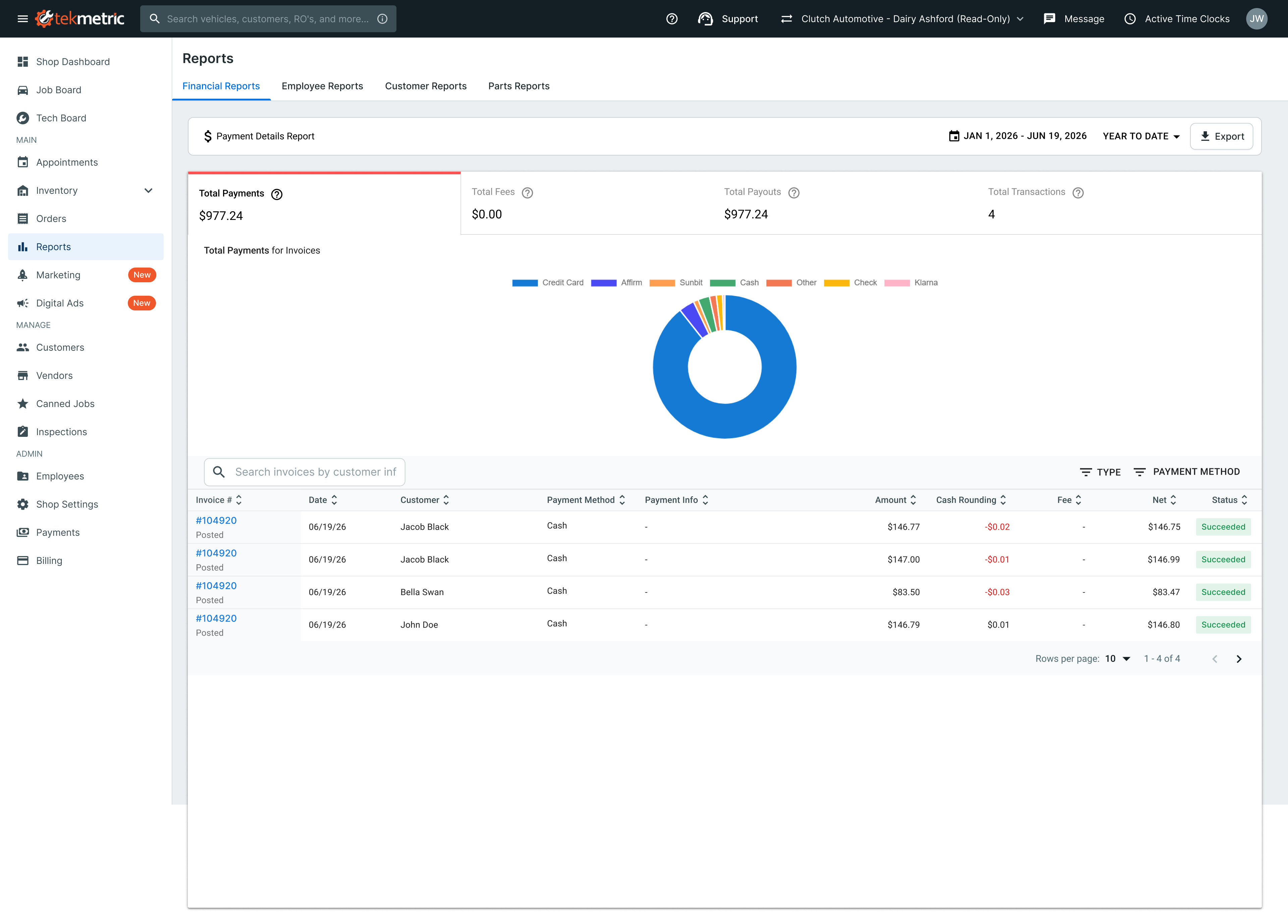
In your Payment Details Report, each cash transaction shows three columns:
-
Amount: The original invoice total (what the customer owed)
-
Cash Rounding: The rounding adjustment applied to that transaction (positive if rounded up, negative if rounded down)
-
Net: The actual cash collected after rounding
This gives you transaction-level visibility into every rounding adjustment.
Example:
Transaction 1
  Amount: $580.99
  Cash Rounding: +$0.01
  Net: $581.00

Transaction 2
  Amount: $347.86
  Cash Rounding: +$0.14
  Net: $348.00
What This Means for Your Accounting
- Your Total Sales and Total Payments always reflects the original invoice totals, not the rounded amounts collected so as to not skew your GP or margins
- The cash rounding adjustment is a separate informational line that provides visibility into rounding activity without impacting your total cashiered amount
- Your Tax Remittance is calculated on the original invoice totals
- Your Stripe payout is unaffected by rounding adjustments
For Service Advisors
When a service advisor selects Cash as the payment method on a repair order:
- The advisor presents the invoice total to the customer (e.g., "$580.99")
- The customer tenders cash
- The system calculates the change due
- If the change includes pennies ($0.01–$0.04 or $0.06–$0.09), and the customer cannot make exact change, the advisor toggles cash rounding on to round the change due to the nearest nickel
- The advisor returns the rounded change to the customer (or tells them no change is due)
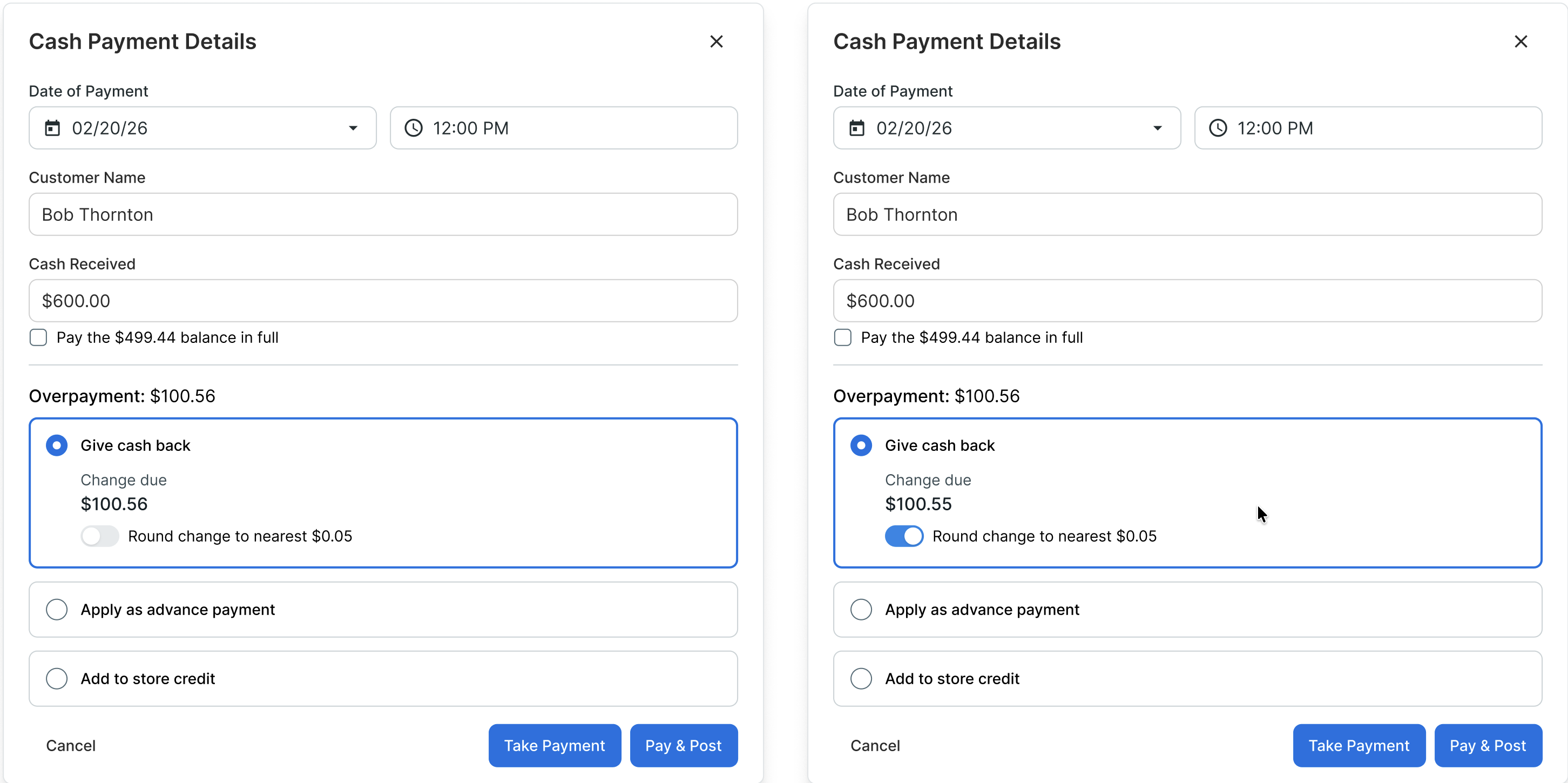
Examples
Example 1: Rounding down
- Invoice total: $580.99
- Customer tenders: $581.00
- Change due (before rounding): $0.01
- Change due (after rounding): $0.00
- The advisor tells the customer: "No change due."
Example 2: Rounding up
- Invoice total: $347.86
- Customer tenders: $348.00
- Change due (before rounding): $0.14
- Change due (after rounding): $0.15
- The advisor gives the customer $0.15 instead of $0.14
Example 3: No rounding needed
- Invoice total: $500.00
- Customer tenders: $501.00
- Change due: $1.00 (ends in nickel, no rounding needed)
- The advisor gives the customer $1.00
What Your Customers See
On the Receipt
The receipt displays the rounding adjustment in the Transaction Details section:
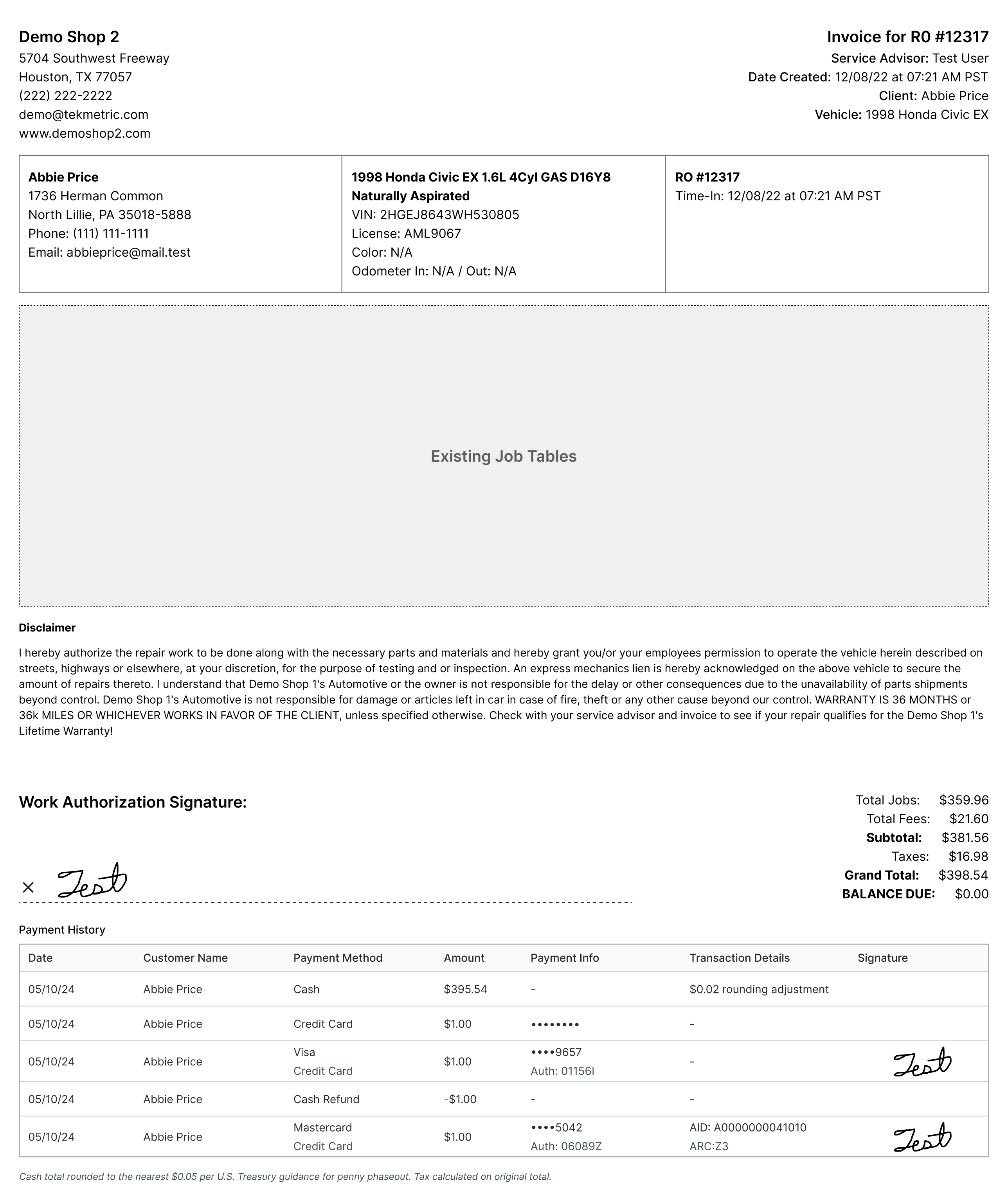
Customers can see:
- The original invoice total
- The rounding adjustment (if applied)
- The total collected
At the Counter
The service advisor presents the invoice total normally. The customer tenders cash. The advisor calculates change, and if it includes pennies, applies rounding based on what cash is available in the drawer. The advisor tells the customer the final change due.
Most customers accept this without pushback—they understand that pennies are no longer available and can see the adjustment on their receipt.
Frequently Asked Questions
Does rounding apply to card payments?
No. Rounding applies only to cash transactions. Card, ACH, check, store credit, gift card, and all other payment methods are unaffected.
What if a customer pays with multiple payment methods (e.g., cash + store credit)?
The customer must cover the entire invoice total using their combination of payment methods. If any balance remains to be paid in cash, rounding applies only to that final cash portion.
Example:
- Invoice: $100.00
- Customer uses: $20.03 store credit + $80.00 cash
- Change due (before rounding): $0.03
- Change due (after rounding): $0.05
- Customer receives: $0.05
Does rounding affect my Stripe payout?
No. Cash rounding adjustments are tracked as informational line items in your End-of-Day (EOD) Report and Payment Details Report. They don't affect the amount you receive in your Stripe payout.
Can I choose a different rounding method (round down vs. round up)?
No. Tekmetric defaults to symmetrical rounding, which is Treasury-recommended and mathematically fair to both you and your customers over time.
Is cash rounding required?
No. Cash rounding is optional. If you choose not to enable it, cash transactions work exactly as they do today. The feature is available for shops that need it.
Do all states allow cash rounding?
Rounding aligns with federal Treasury guidance issued in December 2025. Five states have enacted explicit penny elimination laws (Arizona, Indiana, New Mexico, Tennessee, and Utah), and many others have issued supportive guidance. No state prohibits rounding.
Before enabling this feature, we recommend reviewing your state's penny phaseout policy to confirm there are no additional requirements specific to your location. When you enable rounding, you're confirming that you understand your local requirements.
What happens if a customer disputes the rounding?
This is rare. The receipt clearly shows the rounding adjustment, so customers can see exactly what happened.
If a customer questions the rounding, the service advisor can explain: "Due to the U.S. penny phaseout, we're rounding your change to the nearest nickel per federal guidance. Your change was $0.01, which rounds to $0.00 per the rounding rules."
If a customer has pennies available and prefers to tender exact change, they can always do so—they'll receive their precise change back. Rounding only applies when neither the customer nor the shop has pennies available.
If a customer strongly objects, they have the option to pay with a card instead (rounding never applies to card transactions).
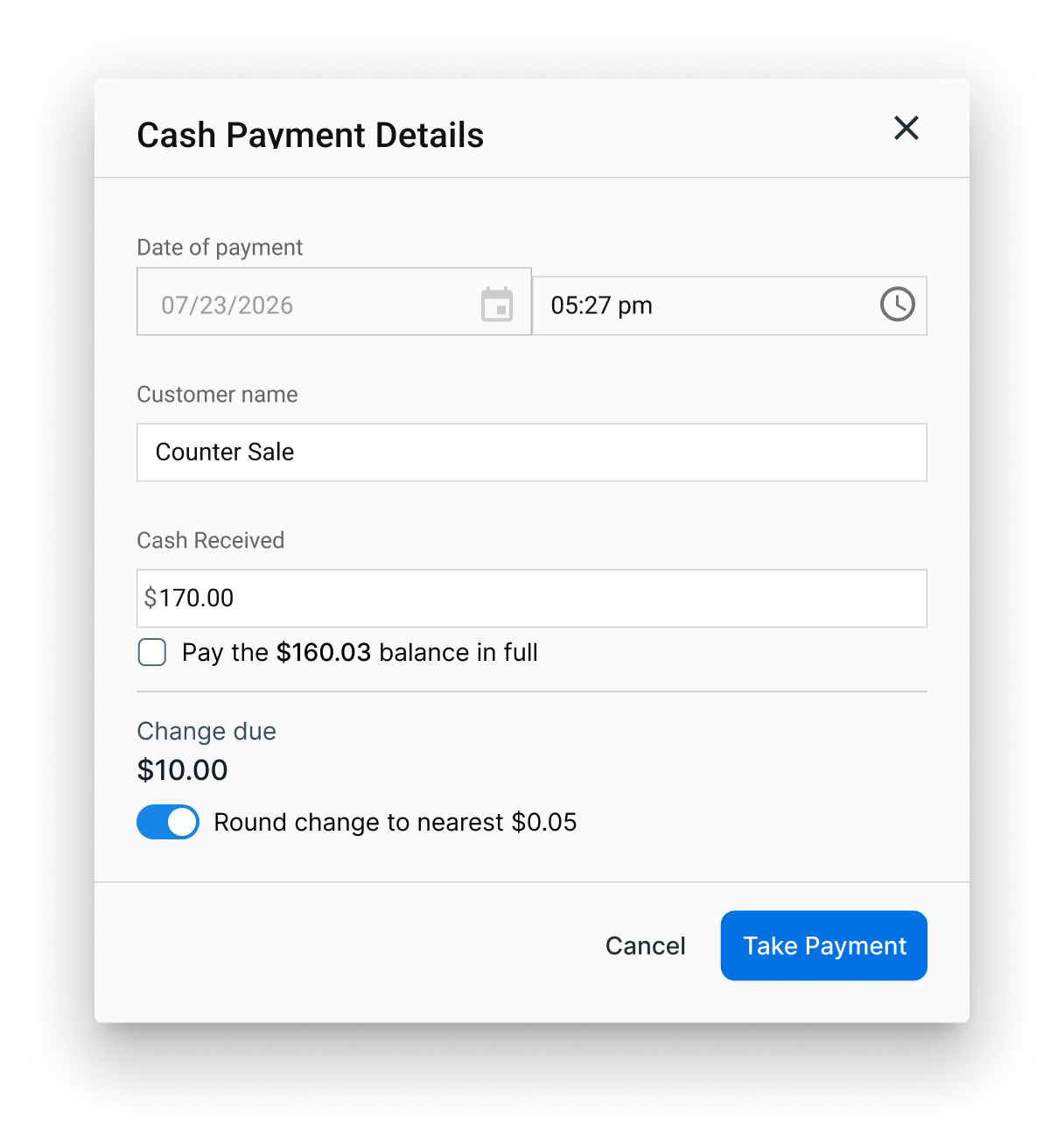
Does rounding apply to counter sales?
Yes. If your shop takes a counter sale and has rounding enabled, the same rounding logic is available to apply to the change due.
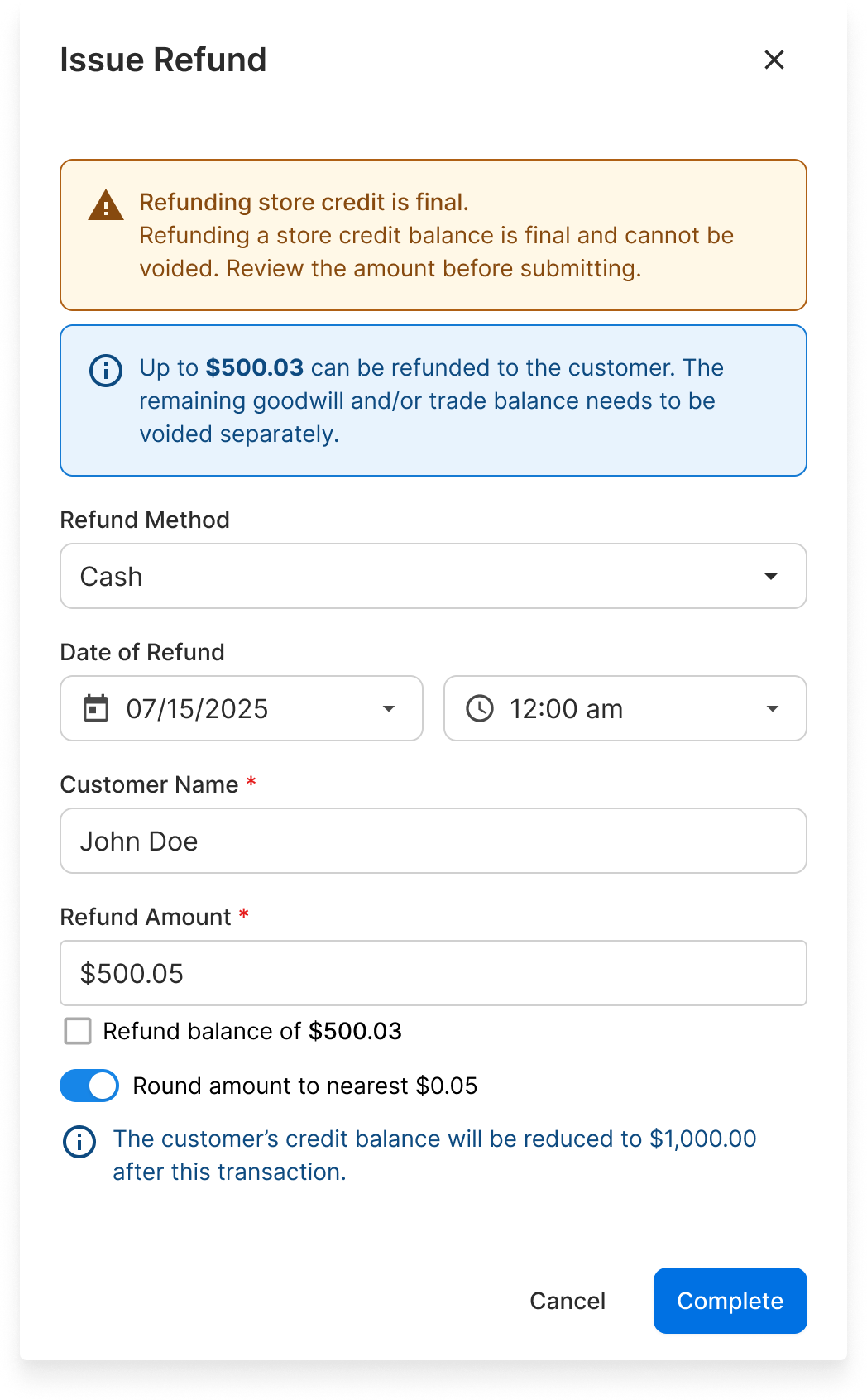
Does rounding apply to cash refunds?
Yes. If your shop processes a cash refund and has rounding enabled, the same rounding logic applies to the refund amount. The refund receipt shows the original refund amount and the rounding adjustment.
How does this impact my Cash Drawer report?
At this time, cash drawer reporting is not impacted by penny rounding updates.
The cash drawer report is currently built to support start-of-day and end-of-day drawer reconciliation. It tracks recorded cash activity at the invoice level, rather than the exact physical cash exchanged during each transaction. Because of that design, rounding adjustments are better reflected in other payment reporting areas today, namely the EOD and Payment Details Reports.
Why does my EOD Report show a "Cash Rounding Adjustment" line?
This line is informational and shows the total amount rounded across all cash transactions that day. It helps you track rounding activity. This line item does not impact your total cashiered amount or the amount you receive in your payout—it is kept separate for visibility and accounting purposes only.
Key Principles
-
Cash rounding is optional. You control whether to enable it.
-
The invoice total never changes. Rounding applies only to the change due, not the invoice balance. If the total is $580.99, it stays $580.99 for accounting and tax purposes.
-
Customers can still pay exact change. If a customer has pennies and tenders exact change, rounding doesn't apply. They receive their precise change back.
-
Transparency is built in. Your receipts clearly display the invoice total and rounding adjustment. Customers can see exactly what happened.
-
Cash only. Rounding never applies to card, ACH, check, store credit, gift card, or any non-cash payment method.
-
Tax is never rounded. You remit sales tax based on the original invoice amount, unaffected by change rounding. This is non-negotiable for compliance.
-
Your accounting is clean. The rounding adjustment appears in your EOD Report and Payment Details Report as an informational line item, so you can see exactly what was rounded and by how much without impacting your GP or margins.
Need Help?
If you have questions about cash rounding or whether it's right for your shop, contact Tekmetric Payments at 832-930-9400 option 2 for Tekmetric Payments then option 2 for Tekmetric Payments Support, or email at tps@tekmetric.com.
For questions about state-specific penny phaseout rules or compliance in your jurisdiction, consult your local chamber of commerce or state revenue agency.