OVERVIEW
Recommended Maintenance on DVI brings interval-based maintenance intelligence directly into the Digital Vehicle Inspection workflow. When a technician opens a repair order and begins an inspection, Tekmetric automatically surfaces OEM-driven maintenance recommendations on relevant inspection tasks so techs know what to look for before they ever touch the vehicle.
This feature builds on the existing Recommended Jobs foundation and layers that intelligence into the DVI itself. No manual lookups, no extra steps.
Note: This feature is only available to shops on the Scale tier.
HOW IT WORKS
Simply select the "Add Recommended Maintenance" button on the inspection.
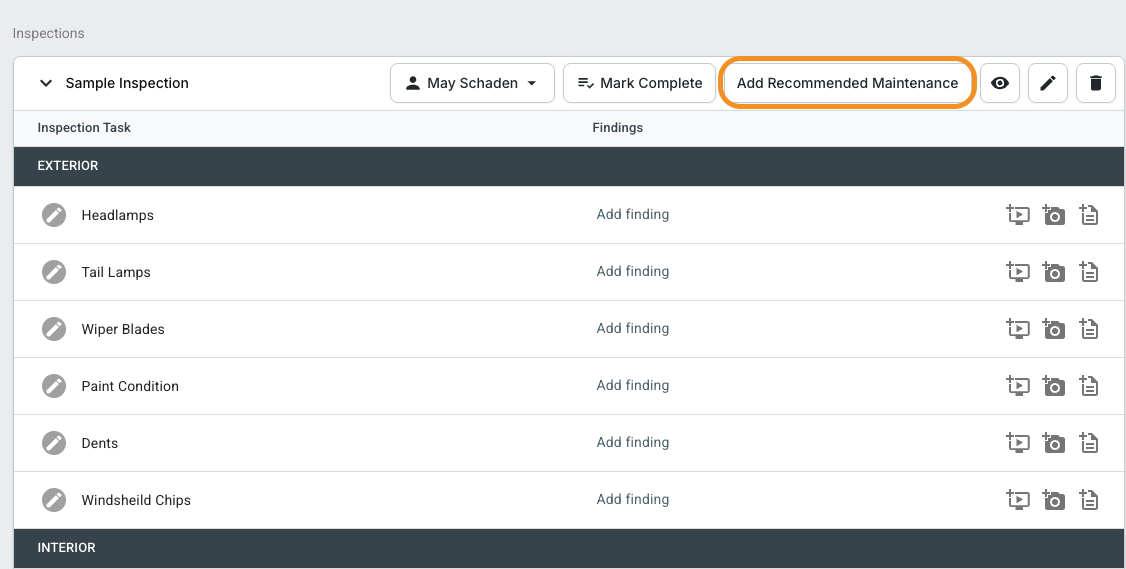
When a technician opens an inspection on a repair order with an odometer reading entered, Tekmetric checks the vehicle's maintenance history and OEM intervals in the background. If a recommended maintenance item maps to an inspection task, that task will automatically display a maintenance recommendation — right alongside the task itself.
Recommendations only appear on yellow-rated and red-rated tasks. Green tasks and unrated tasks are unaffected.
There's nothing for the technician to configure or click to activate; recommendations surface automatically when the conditions are met (however, a shop admin can adjust the intervals source of the interval in settings for Recommended Jobs).
Understanding Recommendation Statuses
Each recommendation displays a status and the OEM interval context so technicians have the full picture at a glance.The recommendation copy follows this format:
-
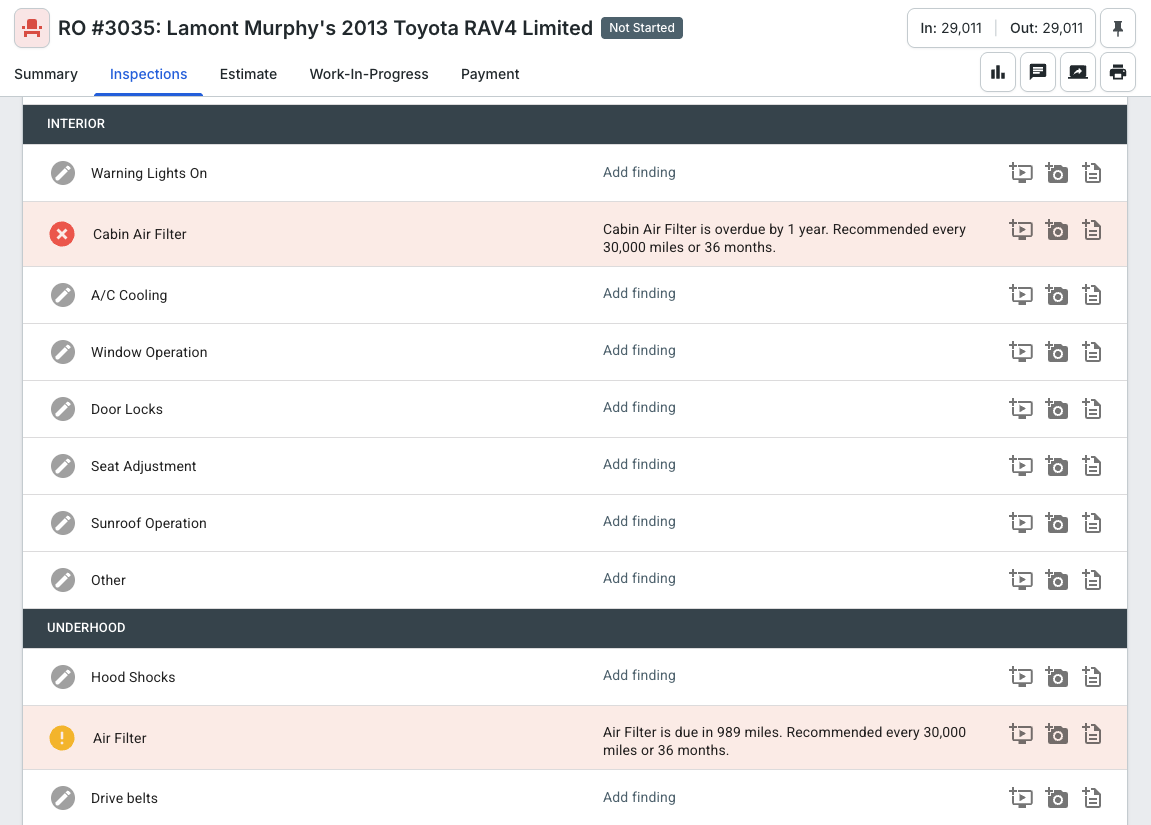
Overdue: [Task name] is overdue by [X miles / X days]. Recommended every [interval].
-
Due Soon: [Task name] is due in [X miles / X days]. Recommended every [interval].
Example:
Engine Air Filter is overdue by 8,000 miles. Recommended every 15,000 miles.
Cabin Air Filter is due in 3,200 miles. Recommended every 15,000 miles.
Task Ratings Are Set Automatically
Based on the recommendation status, the inspection task is pre-rated accordingly:
-
Overdue → task is rated Red
-
Due Soon → task is rated Yellow
Technicians can use the surfaced recommendation to inform and document their inspection findings directly on the task. There's no accept or decline action, just reference the context and add your findings as you normally would.
Example where Recommended Maintenance populates on the DVI:
AVAILABILITY
Recommended Maintenance on DVI is available to shops that have Recommended Jobs enabled. If your shop does not have Recommended Jobs enabled, there is no change to your DVI experience.
To configure Recommended Jobs intervals and job mappings, navigate to Settings → Recommended Jobs. See the Recommended Jobs article for full configuration details.
TASK RATING DEFAULTS
When recommended maintenance intervals surface on a DVI inspection, findings are automatically pre-rated based on their interval status. You can configure what those default ratings are from your Inspection settings.
Where to find it
Shop Settings → RO Settings → Inspections tab
You can also access these settings via the Settings button on the Inspections page.
Who can change this
Users with Shop Settings permission.
What you can configure
| Interval Status |
Available Ratings |
| Overdue |
Now (Red), Soon (Yellow) |
| Due Soon |
Now (Red), Soon (Yellow), OK (Green) |
Tips & Things to Keep in Mind
-
Recommendations require an odometer reading. If no odometer is entered on the repair order, recommendations won't trigger.
-
Only yellow and red tasks surface recommendations. Green or unrated tasks are intentionally excluded to keep the inspection focused.
-
OEM intervals aren't available for every vehicle/job combination. If no interval is defined for a given vehicle, a recommendation may not appear. Ensure your Recommended Jobs settings have Shop or Shortest intervals configured as a fallback.
-
Task ratings are set automatically based on interval status, but technicians can always adjust the rating based on what they observe during the inspection.