Overview
Connecting your Google Business Profile to Tekmetric Marketing unlocks key features including Google review management, review request automations, and AI-generated review responses. This article walks you through how to connect Google, what to do if the connection isn't working, and how to resolve the most common issues reported by shops.
How to Connect Your Google Business Profile
There are two places in Tekmetric Marketing where you can initiate the Google connection:
-
From the Marketing Dashboard: If Google hasn't been connected yet, you'll see a Connect Google Reviews button in the Google Reviews section. Click it to open the authentication window.
-
From Reviews Settings: Go to Marketing → Reviews → Review Settings. This will open the Google integration modal.
Steps to Complete the Connection
- Navigate to Marketing → Reviews in Tekmetric.
- Click Review Settings.
- An authentication window will appear — sign in to your Google account.
- If your Google account has multiple locations, select the location that matches your shop.
- When prompted for permissions, make sure to select "See, edit, create and delete your Google business listings." This permission is required for the integration to work.
Note: After connecting, it can take 4–24 hours for your existing Google reviews to fully populate in Tekmetric.
Common Issues and How to Fix Them
Unsure Which Email is Assigned to Your Google Business Profile If you don't know which Google account manages your shop's listing, try these methods to locate it:
-
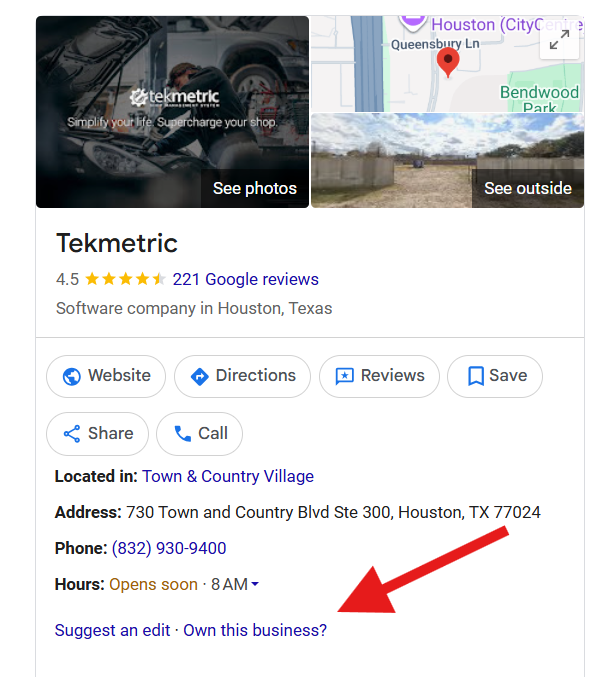
Click "Own this business?": Search for your shop on Google or Google Maps. Click the "Own this business?" or "Claim this business" link on the profile. Google will usually provide a masked version of the current owner's email address (e.g., sh...@gmail.com) to help jog your memory, or give you the option to request access.
Check past emails: Search your potential email inboxes for past messages from "Google Business Profile" or "Google My Business" to see which account receives the notifications.
Check with your team: Ask previous owners, shop managers, or marketing agencies if they claimed the listing under their own account.
Google Review Automation Is Grayed Out The automation stays disabled until a Google Business Profile is connected. Go to Marketing → Reviews → Review Settings and complete the Google authentication. Once connected, the automation becomes available.
Can't Find the Google Connection / Unsure Where to Start Go to the Marketing Dashboard. If Google hasn't been connected, you'll see a "Connect Google Reviews" setup card. This card disappears once the integration is active.
Selected the Wrong Google Location If your account manages multiple locations, you must select the one that matches the current shop in Tekmetric. Wrong location = wrong reviews.
Missing Permission During Authentication You must check "See, edit, create and delete your Google business listings" during sign-in. Without this, responding to reviews and other features will not work.
Reviews Not Appearing After Connection This is expected — it can take up to 24 hours. If reviews are still missing after 24 hours, verify the correct location was selected and the required permission was granted.
What Becomes Available After Connecting Google
-
Review Request Automation — customers get an auto-text 24 hours after their RO posts
-
Review Management — view, filter, and respond to Google reviews directly in Tekmetric
-
AI-Generated Review Responses — draft replies in seconds using the built-in AI writer
-
Marketing Dashboard Widget — track total reviews, star rating, unanswered reviews, and unresolved private feedback
Related Articles